Block Blast Cheats – Block Blast Glitch Tutorial for Unlimited Scores
Want a flawless high-score screenshot for Block Blast? This guide shows a simple, repeatable way to generate any score you want—directly in the browser—on both mobile and desktop.
Overview
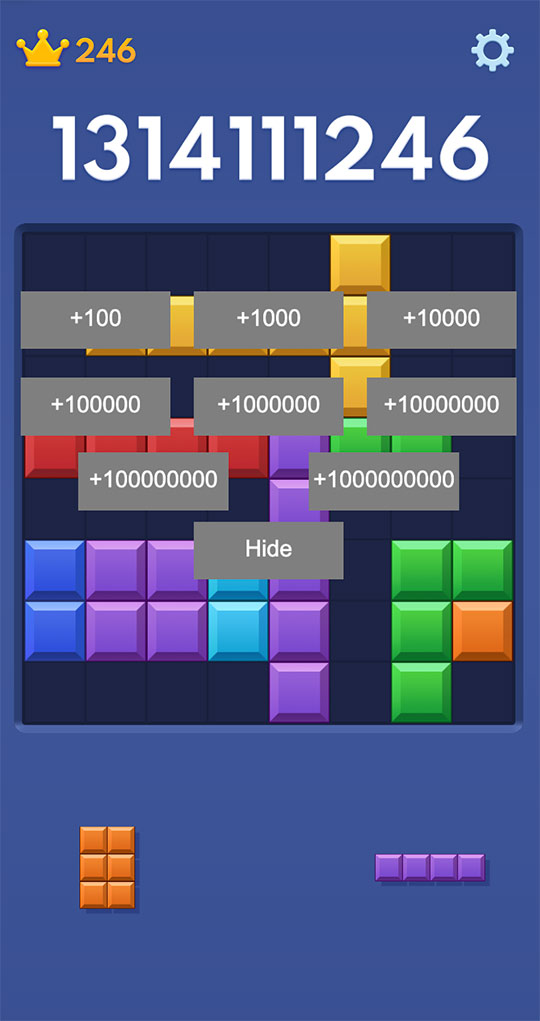
On Block Blast Online you can quickly produce a screenshot with any score by using a built-in score overlay. You'll:
- Open the Classic mode in the browser (mobile or desktop).
- Tap/click the current score several times to reveal the score editor.
- Add predefined increments like
+100,+1000, … up to+100000000. - Press
Hideto close the overlay, then take a clean screenshot.
Step-by-Step: How to Create Unlimited Score Screenshots
- Open the game: visit https://block-blast-online.io. You can use a phone or a computer. The layout adapts to your device.
- Enter Classic mode: tap/click Classic to start a new run. Play normally for a short while so the board looks natural.
-
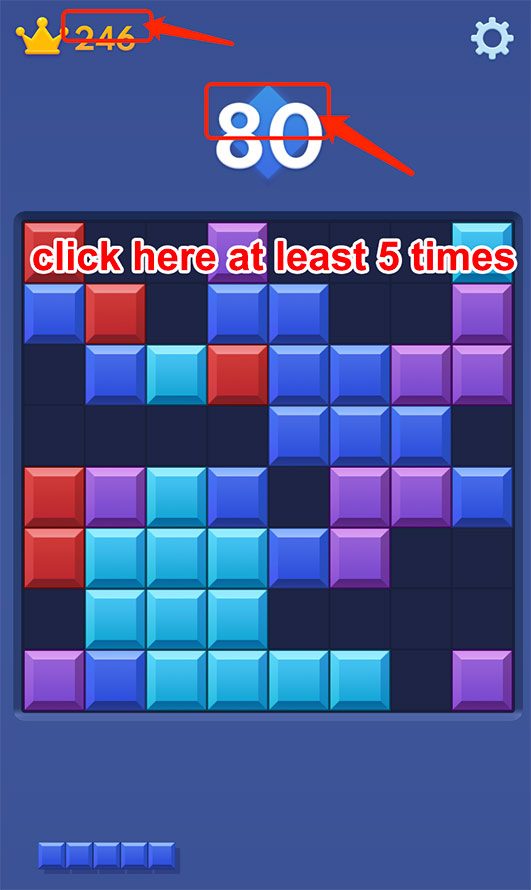
Reveal the score overlay: tap/click the current score at least five times.
This opens a small panel with quick-add buttons such as
+100,+1000, … up to+100000000. - Add points instantly: use the plus buttons to stack points until you reach the number you want. You can also tap the High Score field to modify it directly.
-
Hide the panel: click the
Hidebutton to close the overlay. The game screen now shows your updated score cleanly. -
Take the screenshot:
- Mobile: use your device's screenshot gesture (e.g., Power + Volume Up).
- Desktop: use Cmd+Shift+4 (macOS) or Win+Shift+S (Windows).
Tips for a Perfect Screenshot
- Make it believable: play a few moves first so the board looks organic before you adjust the score.
- Match device UI: mobile and desktop have different safe areas and fonts—capture on the device you intend to share from.
- Remove overlays: after editing, always press
Hidebefore you capture. - Use natural numbers: round figures (e.g., 123,456,789) look less organic than totals ending with small variations.
FAQ: Block Blast Cheats & Glitch Method
Does this change the official Block Blast app?
No. Everything happens inside the browser version at block-blast-online.io. It does not alter the official app or servers.
Is there a Block Blast solver?
Yes—our site also includes an online solver. You can upload a screenshot or fill a grid manually to generate a solution path.
Why tap the score five times?
That gesture reveals the score overlay with quick-add buttons and an editable high-score field.
Can I do this on my phone?
Absolutely. The tutorial works on mobile and desktop. Screen sizes differ, but the steps are the same.
Try It Now
Ready to create your perfect Block Blast high-score screenshot?
Open Block Blast Online, enter Classic mode, reveal the overlay by tapping the score, add points, press Hide, and capture!